
There’s a big difference between knowing how to click buttons in Revit and actually building models that help projects run smoother.
During electrical Revit training, a lot of electrical contractors go through generic software courses instead of proper revit training for contractors, then they jump into a project and immediately get thrown into the deep end. Coordination gets messy, conduit racks don’t work in real life, and the field starts asking questions nobody has answers to. Suddenly the “BIM guy” is surviving off caffeine and bad decisions.
Sound familiar? Well the problem usually isn’t Revit itself. It’s the workflow behind it.
Too many training programs teach software in a vacuum, but real projects happen in crowded ceilings, compressed schedules, coordination meetings that should’ve been emails, and field conditions that somehow change five minutes after you finally finish modeling. That’s why good electrical Revit training for contractors should focus on construction workflows, not just software commands.
Let’s talk about some of the most common Revit and BIM mistakes electrical contractors make and how to avoid them.

Treating Revit Like Drafting Software
One of the biggest mistakes people make is using Revit like it’s just “fancy CAD.” It’s not.
Revit is supposed to support construction workflows. Every modeling decision impacts coordination, prefab, installation, layout, and field execution. That conduit rack might look clean in 3D, but if nobody can physically install it in the sequence you modeled it, it’s just pretty artwork.
Good electrical BIM workflows consider:
- installation and maintenance access
- conduit spacing
- prefab opportunities
- sequencing
- coordination with other trades
- field usability
The goal isn’t just to “have a model.” The goal is to build something useful. That mindset shift alone changes how teams approach modeling.
Starting Projects Without Proper View & Template Setup
Nobody wants to spend time organizing views and templates at the beginning of a project. Until three weeks later when the project browser looks like someone dropped a filing cabinet down a staircase.
Bad setup creates chaos- fast. When projects don’t have consistent systems in place, coordination gets painful and teams waste a ton of time trying to untangle the mess later.
Some of the biggest setup problems include:
- inconsistent naming conventions
- messy project browsers
- missing view templates
- poorly managed or non-existent dependent views
- sheet standards changing from person to person
- not using scope boxes
A clean setup doesn’t just make models prettier. It makes teams faster. And when deadlines start tightening up, fast matters a lot.
Using Generic Revit Families That Don’t Match Real Installation Conditions
Manufacturer families can be incredibly easy in a time crunch… and they can completely wreck a model.
Overloaded families, inaccurate geometry, unnecessary detail, and poorly built content can tank performance and create coordination headaches. Not every family needs to include every screw ever manufactured since 1987.

Families should support the purpose of the model, whether that’s:
- coordination
- prefab
- layout
- documentation
- field installation
That means balancing detail with usability. A clean, lightweight family that accurately represents installation space is usually far more valuable than a hyper-detailed family. Remember that includes the parameters, not just model geometry.
Ignoring Annotation & Schedule Standards
Schedules and annotations don’t get enough respect, but eventually somebody in the field has to actually use them.
Messy tags, inconsistent schedules, unclear naming, and poor annotation standards create confusion fast. And confusion in construction usually turns into:
- extra labor
- extra phone calls
- extra RFIs
- extra yelling
- extra crying
The best documentation is boring in the best possible way: clear, consistent, easy to read, and easy to trust. When schedules are built properly, accuracy and QC processes improve, prefab workflows improve, material tracking becomes easier, and field teams spend less time decoding whatever mystery system the office created.
Modeling Conduit Without Thinking About Installation
Everybody has seen it before: a beautiful conduit layout in Revit that absolutely nobody can install in real life. The model technically works, but reality? Yeahhh not so much.
Good conduit modeling requires thinking beyond the screen. Things like: rolling offsets, elevation management, rack spacing, bend requirements, installation access, and trade coordination all matter way more than people think.
Don’t forget about reset junction boxes either. You need to be able to access them during and after construction. Don’t bury them like pirate treasure where you cannot find it later (you know, except it is in the ceiling)
Waiting Until Coordination Meetings to Find Problems
Coordination meetings should not be the first time you review your own model. And yet, that’s exactly how a lot of teams operate. Too many contractors wait until clash detection starts before checking clearances, routing conflicts, elevation issues, missing content, and just overall model cleanliness.
That usually leads to painful coordination meetings where everybody discovers problems live in front of each other like some kind of construction-themed reality show.
Say it with me: Internal. Reviews. Matter. Using section boxes, internal QA processes, internal clash tests between trades, and regular cleanup before meetings helps coordination move faster and keeps your team from becoming “that contractor” everybody dreads seeing on the agenda.

Ignoring Small Efficiency Improvements
A shocking amount of time gets wasted doing things the hard way every single day. Simple improvements can save massive amounts of time over the life of a project, including:
- keyboard shortcuts
- selection filters
- better tagging workflows
- cleaner browser organization
- view management habits
Experienced modelers are not necessarily faster because they click quicker. They’re faster because their workflows are cleaner. Small efficiencies compound hard over time, especially on large projects where tiny delays happen hundreds of times per day.
Having a lean model not bloated with 10,000 unused families and views saves time opening, syncing to central, creating new views, filters… the list goes on and on…
Treating BIM Like an Office-Only Process
BIM should support the field, not just create prettier coordination screenshots for meetings nobody wanted to attend in the first place. The best workflows connect office, prefab, field, layout crews, foreman, and project management.
When field teams are disconnected from the model, problems start multiplying. Install confusion, mistrust in the BIM process, missing information, prefab delays, layout issues, and coordination misunderstandings all become more common.
The model should help construction happen more efficiently. If it only exists for coordination meetings, you’re leaving a lot of value on the table, and wasting a lot of time and money in the process.
Learning Software Without Understanding Construction Workflows
One of the biggest problems in the industry right now is that a lot of people know Revit, but far fewer understand construction workflows. There’s a huge difference between knowing what a button does and understanding how a modeling decision impacts prefab, installation, sequencing, labor, and coordination in the real world.
The Problem Isn’t Revit. It’s How Most People Are Taught to Use It.
That’s exactly why we created BIM Accelerate, an electrical Revit training for contractors program focused on real construction workflows instead of generic software lessons.
Instead of generic software training, BIM Accelerate focuses on real electrical construction workflows, including:
- project setup & best practices
- conduit & cable tray modeling
- coordination workflows
- clash detection
- annotations & schedules
- Navisworks fundamentals
- efficiency tips for real projects
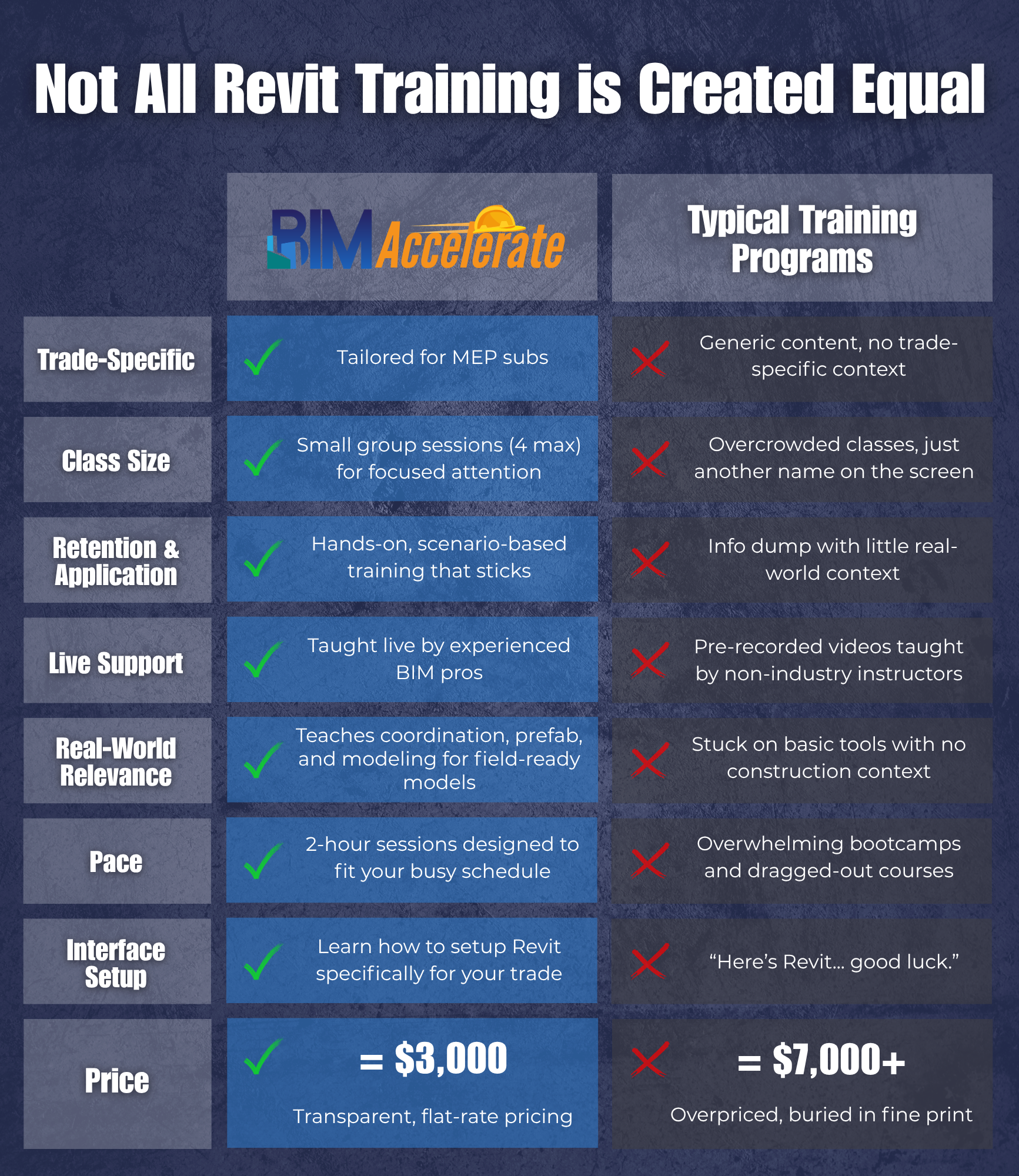
If your team is trying to move beyond “we kinda know Revit” and build workflows that actually support coordination, prefab, and field execution, BIM Accelerate was built for exactly that.
Download the curriculum, check out the training topics, or reach out to talk through what your team is struggling with. Odds are, we’ve seen it before.
Click here to learn more:
And check out out new live training series for electrical contractors, Amp Up Your Modeling, to get a taste of some of the BIM Accelerate lessons for free. We do these trainings live once every other month, and they’re available on-demand on YouTube. Follow us on social media to keep up with the live trainings schedule.
Click here to watch the Amp Up Your Modeling training series: